


Car Cast - Screen Mirror
2.111.00 Reviews
App Specs
- Version
- 4.2.0
- Updated On
- License
- Free
- Downloads
- 10,000+
- Developer
- Toxic Degu Ltd
- Categories
- Auto & Vehicles
- Platform
- Android
Screenshots
 Analysis by AppCompare
I like the idea behind Car Cast - Screen Mirror: use a phone with a car display instead of repeatedly glancing down at a handset. That can make a familiar drive feel simpler, especially when I already rely on my phone for directions or audio. The key question, though, is not just whether screen sharing sounds convenient; it is whether the connection between a particular phone and car is dependable enough to be useful in everyday driving.
When the connection makes or breaks the trip
Car Cast is a phone-to-car screen-sharing app from Toxic Degu Ltd, in the Auto & Vehicles category. Its central promise makes connectivity the whole experience: the phone and vehicle display need to work together, so compatibility is the first thing I would check rather than assume. A car having a large screen does not automatically mean it can mirror a phone, and a successful setup on one vehicle does not prove it will behave the same way in another.
That matters most at the moments when I need the display to be predictable. Before setting off, I would test the connection while parked, open the content I expect to use, and check that the picture and sound behave as intended. It is a more useful trial than discovering a pairing snag while already navigating an unfamiliar route. If the connection is inconsistent at home, I would not make it the sole plan for a long drive.
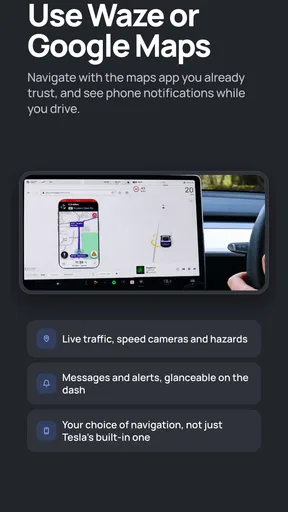
A realistic use case is a weekend trip where I want to look at a route on the car screen and listen to audio from my phone. I would prepare the route and playlist before leaving, confirm that the display is receiving the phone’s screen, then put the phone somewhere secure. That small routine reduces fiddling once I am moving. It also gives me a quick answer to the practical question many drivers have: does the setup stay useful after the first successful connection, or does it need attention each time?
What it is like in different mobile settings
The app is free to install and is rated for Everyone, so it is easy to consider for a shared household car. Its current version is 4.2.0, and it has passed 10,000 installs. I would still judge it by the phone and vehicle combination I actually plan to use. A family member’s successful setup is encouraging, but it is not a substitute for checking my own device and car together.
The cross-platform appeal is straightforward: households that use different kinds of phones may prefer a screen-sharing option that can serve more than one person. But I would treat that as a reason to test each setup separately, not as a guarantee that every combination offers the same experience. If several people share the vehicle, it is also worth agreeing who connects and prepares the phone before the car moves. That avoids turning a quick handover into a round of troubleshooting at the curb.
Car Cast is less compelling when I only need a single basic task and my car already handles it comfortably through its own built-in system. For turn-by-turn directions, a phone mount may be the simpler fallback; for familiar music, the car’s existing audio controls may be enough. Screen mirroring is most worthwhile when putting the phone’s display on the larger screen solves a real inconvenience, rather than adding another connection to manage.
Worth Reading Before You Choose

Flipboard Shows What News Apps Must Do Beyond the Feed

Switching to Android Auto Means Rethinking Your Driving Routine

Google Calendar Makes a Crowded Week Easier to Manage

Ludo King Makes the Most of the Minutes Between Plans

Baby Panda World Brings Quick Play to Modern Phones, but Its Game Library Feels Busy

ESPN’s Live Game View Makes Following Close Games Easier
Recovering gracefully when something goes wrong
Connection-based tools can be frustrating because a failure may come from the phone, the vehicle display, or the way the two are communicating. I would avoid assuming that every blank screen or interruption means the app itself is broken. A sensible first response is to stop safely, check the phone and car display, and retry the setup only when the vehicle is parked. If that does not help, switching to the car’s normal controls or a secured phone mount is safer than troubleshooting while driving.
One practical tip is to test the exact workflow you intend to use, not merely whether the screens connect once. Try opening the map or audio app you care about, then check whether the controls remain comfortable to use from the driver’s position. This catches an important difference between “the phone appears on the display” and “the arrangement is genuinely convenient.” It also helps me decide whether to keep using the app for that vehicle or reserve it for occasional trips.
Another trade-off is that mirroring can make a familiar phone interface larger without necessarily making it a better driving interface. A screen that is easy to tap while parked may still invite too much attention on the road. I would set the route and audio before moving, rely on voice interaction only when it is supported and safe to do so, and avoid browsing or adjusting unrelated content while driving. The larger display should reduce glances, not encourage more interaction.
Data, subscriptions, and sensible expectations
The app itself is free, but it includes in-app purchases ranging from $2.99 to $49.99 per item. I would look carefully at any purchase screen before paying and decide whether the feature being offered addresses a need I actually have. A free download is a low-commitment way to see whether the phone-to-car idea fits my routine, but it does not mean every possible use is included at no cost.
For data-conscious drivers, I would separate the act of mirroring from the content being shown. A screen-sharing connection is not the same thing as downloading or streaming media, and maps or online audio may use data through their own services. If my mobile plan is limited, I would prepare what I can before the trip and keep an eye on the apps supplying the content. That is more useful than treating the mirror alone as the only source of data use.
The app has an average rating of 2.1 from 40 ratings, alongside 10 written reviews. I would take that low average seriously as a reason to be cautious, particularly if I need a dependable setup every day, while remembering that ratings do not tell me whether a particular phone-and-car pairing will work well. The best personal test is a parked trial before relying on it. If it behaves inconsistently, a built-in car interface or a simple phone mount may be the more dependable choice.
Setting Up and First Impressions
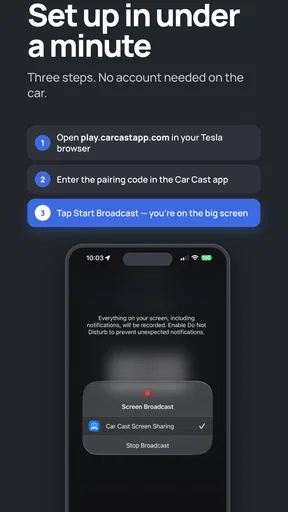
Getting started with Car Cast is surprisingly straightforward. You just download the app on your phone, and it practically sets itself up. Of course, you need to make sure your car’s display is compatible. Most modern cars should be good to go, but it's always worth checking if your car supports screen mirroring.
Once you have it installed, the app guides you through the setup process. It’s like having a tech-savvy friend holding your hand through it all. The interface is clean and intuitive, which is a big plus if you're not super techy. It’s nice not feeling overwhelmed by a bunch of buttons and options.
Features That Stand Out
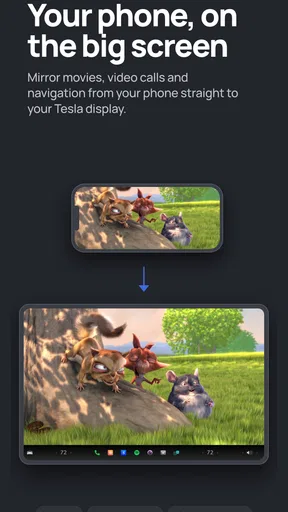
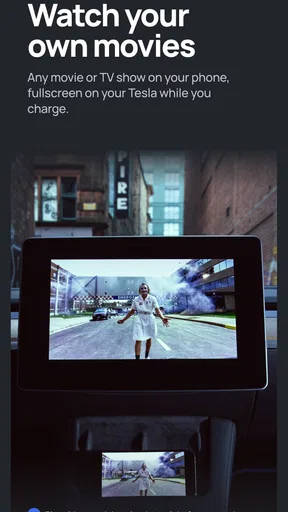
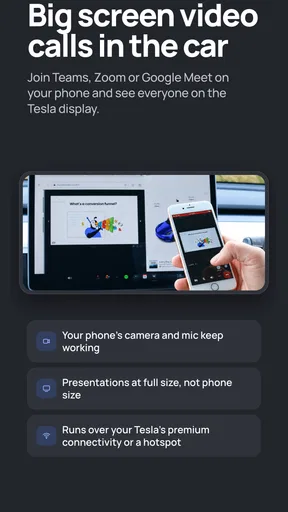
The main highlight of this app is how seamlessly it mirrors your phone screen to your car display. Whether you’re navigating with Google Maps or streaming your favorite playlist, it’s all there on the big screen. No more squinting at your phone while trying to drive safely.
One feature I found particularly handy is the app's ability to work with both Android and iOS devices. Having this flexibility is great, especially if you're someone who switches between platforms or shares your car with family members who use different devices.
Another neat feature is the voice control integration. You can use voice commands to control the app, which is a lifesaver when you’re trying to keep your eyes on the road. Just say the word, and your phone listens.
Performance on the Road
So, how does it perform when you’re actually on the road? Pretty darn well, if you ask me. The mirroring quality is sharp, and there’s minimal lag, which is crucial when you’re relying on your GPS to get you through a maze of city streets. The audio quality is also impressive, whether you're taking a call or jamming out to your favorite tunes.
One thing to keep in mind is that the app does use a bit of data, so if you’re on a limited plan, you might want to be mindful of your usage. Also, it’s good to have a reliable phone mount in your car, even with the mirroring. It keeps everything in place and ensures you’re not fumbling around.
Final Thoughts
All in all, Car Cast is a solid app for those who want to make their car rides more enjoyable and less complicated. It’s like having your phone’s capabilities right on your car’s dashboard. While it’s not entirely perfect, it’s pretty close.
If you’re someone who spends a lot of time driving, whether it’s for work or just everyday errands, this app is worth checking out. It simplifies the user experience, and who doesn’t love a bit of simplicity in their life?
So, if you’re ready to give your car display an upgrade and make your drives a bit smoother, you might want to consider downloading the app. It’s available for both Android and iOS, so no matter what phone you’re using, it has got you covered. Safe travels!
Pros
- Easy setup and user-friendly interface.
- High-quality video mirroring experience.
- Supports a wide range of devices.
- Minimal lag during screen casting.
- Regular updates enhance functionality.
Cons
- Occasional connectivity issues.
- Ads can be intrusive for free users.
- Limited features in the free version.
- Requires stable internet for best performance.
- Compatibility varies with older devices.
FAQs for Car Cast - Screen Mirror
What is Car Cast - Screen Mirror, and how does it work?
Car Cast - Screen Mirror is an app designed to mirror your smartphone's screen onto your car's infotainment system. By connecting your device via USB or Wi-Fi, you can project apps, videos, and other content onto a larger display. This enhances the driving experience by providing easy access to navigation, music, and more.
Is Car Cast - Screen Mirror compatible with all car models?
Car Cast - Screen Mirror is compatible with many newer car models that support screen mirroring or Android Auto/Apple CarPlay. However, compatibility may vary based on the vehicle's make, model, and year. It's recommended to check the app's compatibility list or your car's manual to ensure seamless integration.
Does Car Cast - Screen Mirror affect my phone’s performance or battery life?
Using Car Cast - Screen Mirror can slightly impact your phone's performance and battery life, especially if used for extended periods. The app runs in the background and streams content continuously, which can lead to increased battery consumption. It's advisable to have a charger handy while using the app in your car.
Is it safe to use Car Cast - Screen Mirror while driving?
Car Cast - Screen Mirror is designed to enhance convenience and safety by allowing you to access important apps hands-free. However, it's crucial to use the app responsibly and avoid distractions while driving. Always prioritize road safety and ensure that any interaction with the app is done while the vehicle is stationary.
How do I troubleshoot connection issues with Car Cast - Screen Mirror?
If you're experiencing connection issues, first ensure that both your phone and car's system are compatible and updated. Check your cable or Wi-Fi connection, and restart both devices. If problems persist, consult the app's support section or contact customer service for further assistance.


